Natural Language Processing

What is Natural Language Processing (NLP) ?
Natural Language Processing (NLP) is a branch of AI that enables computers to understand, interpret, and generate human language.
It helps computers communicate with humans using languages such as English, Hindi, French, etc.
Examples:
- ChatGPT
- Google Translate
- Siri
- Alexa
Definition:
👉 NLP is the technology that allows computers to understand and process human language.
Features of NLP
A. Language Understanding
Helps computers understand the meaning of human language.
Example: Understanding a user's question.
B. Language Generation
Helps computers generate meaningful responses.
Example: ChatGPT answering questions.
C. Speech Recognition
Converts spoken words into text.
Example: Voice typing in Google Docs.
D. Language Translation
Converts text from one language to another.
Example: Google Translate.
E. Sentiment Analysis
Identifies emotions in text.
Example: Detecting whether a review is positive or negative.
Human Language vs Computer Language
Human Language Computer Language
Used by humans for communication Used to communicate with computers
Examples: English, Hindi Examples: Python, Java, C++
Flexible and ambiguous Strict and precise
Easy for humans to understand Easy for computers to understand
May have multiple meanings Has fixed rules and syntax
Example
Human Language:
"Can you open the window?"
Computer Language:
Why is NLP Important?
NLP is important because:
✔ It enables communication between humans and computers.
✔ It helps computers understand human language.
✔ It saves time by automating language-related tasks.
✔ It supports voice assistants and chatbots.
✔ It helps analyze large amounts of text quickly.
Applications of NLP
A. Chatbots
What it does:
Provides automatic responses to users.
Example:
Customer support chatbots.
Why NLP?
Because the chatbot understands and replies in human language.
B. Voice Assistants
What it does:
Understands spoken commands and performs tasks.
Examples:
- Siri
- Alexa
- Google Assistant
Why NLP?
Because they understand speech and generate responses.
C. Language Translation
What it does:
Converts one language into another.
Example:
Google Translate.
Why NLP?
Because it understands the meaning of text before translating.
D. Sentiment Analysis
What it does:
Identifies emotions or opinions in text.
Example:
Product review analysis.
Why NLP?
Because it analyzes the meaning and sentiment of words.
E. Spam Detection
What it does:
Identifies unwanted emails.
Example:
Gmail Spam Folder.
Why NLP?
Because it analyzes email text to determine if it is spam.
F. Text Summarization
What it does:
Creates a short summary of a long document.
Example:
AI-generated article summaries.
Why NLP?
Because it understands important information from the text
G. Speech-to-Text
What it does:
Converts spoken words into written text.
Example:
Voice Typing.
Why NLP?
Because it understands spoken language and converts it into text.
Improve Your Knowledge with Orange Workflow

Stages of NLP
When a computer processes human language, it follows several stages.
A. Lexical Analysis
What is it?
The process of breaking text into smaller units called tokens (words, symbols, punctuation).
Example:
Sentence:
"AI is amazing."
Tokens:
AI | is | amazing
Purpose:
✔ Identifies words in the text.
B. Syntactic Analysis
What is it?
Checks whether the sentence follows correct grammar rules.
Example:
✔ "I am a student." (Correct)
❌ "Student a am I." (Incorrect)
Purpose:
✔ Understands sentence structure.
C. Semantic Analysis
What is it?
Determines the meaning of words and sentences.
Example:
"The dog chased the cat."
Computer understands:
- Dog = animal
- Cat = animal
- Chased = action
Purpose:
✔ Understands sentence meaning.
D. Discourse Integration
What is it?
Uses information from previous sentences to understand the current sentence.
Example:
"Riya has a book. She reads it every day."
Computer understands:
- She = Riya
- It = Book
Purpose:
✔ Connects meanings across multiple sentences.
E. Pragmatic Analysis
What is it?
Understands the real intention behind a sentence using context.
Example:
"It's very cold here."
Actual meaning:
👉 Please close the window.
Purpose:
✔ Understands what the speaker really means.
NLP Stages Flow
Text → Lexical Analysis → Syntactic Analysis → Semantic Analysis → Discourse Integration → Pragmatic Analysis
Online Learning Programs for Orange Workflow
F. Stemming
What is it?
Reduces words to their root form by removing prefixes or suffixes.
Example:
Original Word Stemmed Word
Playing Play
Played Play
Playingly Play
Purpose:
Reduces similar words to a common root.
G. Lemmatization
What is it?
Converts words to their meaningful dictionary form (lemma).
Example:
Original Word Lemmatized Word
Running Run
Better Good
Mice Mouse
Purpose:
Produces meaningful root words.
Stemming vs Lemmatization
Stemming Lemmatization
Removes prefixes/suffixes Uses dictionary meaning
Faster More accurate
May produce non-meaningful words Produces meaningful words
Example: Studies → Studi Example: Studies → Study
Techniques of NLP
NLP uses different techniques to help computers understand and analyze text.
The important NLP techniques are:
- Bag of Words (BoW)
- TF-IDF
- NLTK
Bag of Words (BoW)
Bag of Words is a technique that converts text into numerical data by counting how many times each word appears.
Key Idea:
👉 Word order is ignored.
👉 Only the frequency (count) of words is considered.
Example
Sentence 1:
"I like AI"
Sentence 2:
"I like Machine Learning"
Step 1: Create Vocabulary
Vocabulary =
Word
I
Like
AI
Machine
Learning

Improve Your Knowledge with Orange Workflow
Steps in Bag of Words
Step 1
Collect all text documents.
Step 2
Create a vocabulary of unique words.
Step 3
Count how many times each word appears.
Step 4
Represent each document as a numerical vector.
Advantages
✔ Simple to understand
✔ Easy to implement
✔ Useful for text classification
Limitation
Ignores word order and context.
B. TF-IDF
TF-IDF (Term Frequency – Inverse Document Frequency) is a technique used to identify important words in a document.
Key Idea
Words that appear:
✔ Frequently in one document
✔ But rarely in other documents
are considered more important.
TF-IDF Formula
TF (Term Frequency)
Measures how often a word appears in a document.
IDF (Inverse Document Frequency)
Measures how unique a word is across all documents.
TF-IDF
TF × IDF
Example
Document 1
"AI is useful. AI helps students."
Document 2
"Students use computers."
Analysis
Word AI
- Appears many times in Document 1
- Does not appear in Document 2
➡ High TF-IDF Score
Word Students
- Appears in both documents
➡ Lower TF-IDF Score
Conclusion
TF-IDF considers AI more important than Students.
Unlock Your Potential with Orange Workflow
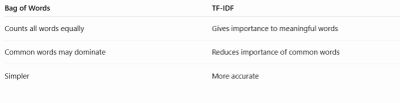
Why TF-IDF is Better than Bag of Words?
Applications of TF-IDF
1. Search Engines
Finds the most relevant web pages.
Example:
Google Search
2. Document Classification
Classifies documents into categories.
Example:
News Classification
3. Spam Detection
Identifies spam emails using important keywords.
4. Text Summarization
Finds important words and sentences for summaries.
5. Recommendation Systems
Suggests similar articles or documents.
C. NLTK
NLTK (Natural Language Toolkit) is a popular NLP library used for working with human language.
It provides tools for:
- Tokenization
- Stopword Removal
- Stemming
- Lemmatization
- Text Analysis
Purpose
Helps developers build NLP applications more easily
Other Popular NLP Libraries
1. spaCy
What is spaCy?
A modern NLP library designed for fast and efficient language processing.
Features
✔ Fast processing
✔ Named Entity Recognition
✔ Part-of-Speech Tagging
✔ Text Classification
Example Uses
- Chatbots
- Virtual Assistants
- Information Extraction
2. Gensim
What is Gensim?
An NLP library mainly used for topic modeling and document similarity.
Features
✔ Topic Identification
✔ Document Comparison
✔ Text Analysis
Example Uses
- Finding topics in articles
- Grouping similar documents